
How To Withdraw Money From PKRSpin?
If you have won big on the PKRSpin game and now want to cash out your winnings, you are in the right place. The PKRSpin withdrawal process is straightforward but requires a few important steps to complete correctly. This guide covers everything you need to know about withdrawing money from the PKRSpin app, including how to add your payment method, turnover requirements, and tips for a smooth withdrawal experience.
What You Need Before Withdrawing on PKRSpin
Before you initiate a PKRSpin withdrawal, there are a few things you must have ready. First, you need a linked E-Wallet (JazzCash or EasyPaisa) or a Bank Account added to your PKRSpin app account. Second, you must meet the withdrawal turnover requirements set by the PKR Spin platform. Without completing these two things, your withdrawal request will not go through.
PKRSpin Withdrawal Methods
When you open the withdrawal page inside the PKRSpin app, you will see two tabs at the top of the screen:
Both methods are available on the PKRSpin APK and work reliably for Pakistani players.
How To Add an E-Wallet for PKRSpin Withdrawal
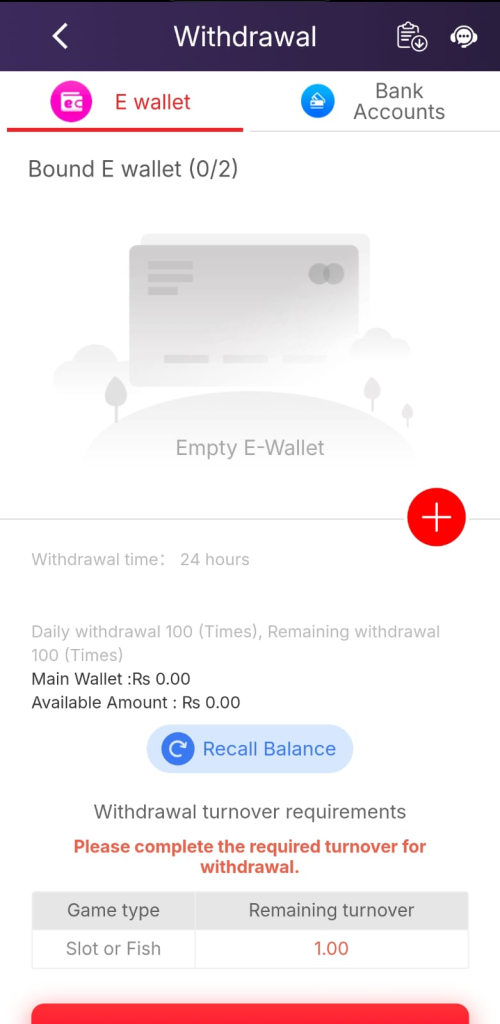
If your E-Wallet section shows “Empty E-Wallet,” you need to bind your JazzCash or EasyPaisa account first. Here is how to do it:
Tap the red plus (+) button on the E-Wallet screen inside the PKRSpin app. A form will appear asking for your mobile wallet details. Enter your JazzCash or EasyPaisa registered mobile number and any other required information. Save the details and your E-Wallet will be bound to your PKR Spin account. You can add up to 2 E-Wallets in total.
Once your E-Wallet is successfully linked, you can proceed with the PKRSpin withdrawal request anytime.
PKRSpin Withdrawal Time
According to the withdrawal page in the PKRSpin app, the standard withdrawal processing time is 24 hours. This means after you submit your withdrawal request, it may take up to 24 hours for the funds to arrive in your JazzCash, EasyPaisa, or bank account. In most cases withdrawals are processed faster, but 24 hours is the maximum window stated by the PKRSpin game platform.
PKRSpin Daily Withdrawal Limit
The PKR Spin platform allows up to 100 withdrawal requests per day. The remaining withdrawal count resets daily. This is more than enough for regular players. Your Main Wallet balance and Available Amount are both displayed on the withdrawal screen so you always know exactly how much you can withdraw from your PKRSpin account.
PKRSpin Withdrawal Turnover Requirements
This is the most important part of the PKRSpin withdrawal process that every player must understand. Before you can withdraw your winnings, the PKRSpin game requires you to complete a minimum turnover (also called wagering requirement).
The withdrawal screen clearly shows a turnover requirements table with two columns — Game Type and Remaining Turnover. For Slot or Fish games, the remaining turnover required is shown in red (for example, 1.00). This means you need to place bets totaling that amount in Slot or Fish games before your withdrawal becomes eligible.
The platform displays a warning message: “Please complete the required turnover for withdrawal.” Until this turnover is met, the withdrawal button will remain inactive on the PKRSpin app.
Step-by-Step PKRSpin Withdrawal Guide
- Step 1 — Open the PKRSpin App Launch the PKRSpin app or PKRSpin APK on your mobile device and log in to your account.
- Step 2 — Tap the Withdraw Button On the home screen of the PKRSpin game, tap the Withdraw button. This will take you directly to the withdrawal page.
- Step 3 — Choose Your Withdrawal Method Select either the E-Wallet tab or the Bank Accounts tab depending on where you want to receive your funds.
- Step 4 — Add Your Payment Method (First Time Only) If you have not linked a payment method yet, tap the red plus (+) button and add your JazzCash, EasyPaisa, or bank account details. This is a one-time setup on the PKR Spin platform.
- Step 5 — Check Your Available Balance Review your Main Wallet balance and Available Amount shown on the screen. Tap the Recall Balance button if you need to pull back funds from any running games into your main wallet on the PKRSpin app.
- Step 6 — Complete Turnover Requirements Check the Withdrawal Turnover Requirements table. If there is any remaining turnover for Slot or Fish games, play until that amount is cleared. Only then will the PKRSpin withdrawal become available.
- Step 7 — Submit Your Withdrawal Request Once all requirements are met, enter your withdrawal amount and tap the withdrawal button at the bottom of the screen. Your request will be processed within 24 hours by the PKRSpin game team.
What Is the Recall Balance Feature on PKRSpin?
The Recall Balance button on the PKRSpin app withdrawal page is a very useful feature. When you are playing games on the PKR Spin platform, some of your balance may be locked inside active game sessions. The Recall Balance button pulls all of that scattered balance back into your Main Wallet so it becomes available for withdrawal. Always tap this button before checking your available withdrawal amount to make sure you are seeing your full balance.
Tips for a Smooth PKRSpin Withdrawal
Always bind your E-Wallet or bank account before you need to withdraw — do not wait until you have winnings ready, as the linking process can take a little time. Double-check that the mobile number you enter for JazzCash or EasyPaisa matches the registered number on your wallet, otherwise the withdrawal will fail. Keep an eye on the turnover requirements table in the PKRSpin app while playing so you are never surprised when it is time to withdraw. If your withdrawal is taking longer than 24 hours, use the live chat support button (headset icon) at the top right of the withdrawal page in the PKRSpin game and provide your withdrawal request ID.
Frequently Asked Questions
Final Thoughts
The PKRSpin withdrawal process is designed to be simple and secure for Pakistani players. As long as you have a linked payment method and have completed the required turnover in the PKRSpin game, cashing out your winnings is quick and hassle-free. Download the latest PKRSpin APK, keep your wallet details updated, and use the tips in this guide to ensure every PKR Spin withdrawal goes smoothly.